
Turbo Duration per Asset Configuration
Overview
The Duration per Asset feature allows administrators to customize which Turbo duration options are available for each individual trading asset. This provides granular control over the trading experience, enabling you to tailor duration availability based on asset characteristics, volatility, liquidity, and risk management requirements.
Accessing the Configuration
Step 1: Navigate to Asset Management
In the back-office admin panel:
- Log in to the admin/back-office system
- Navigate to Asset Management or Trading Configuration
- Locate the Turbo Duration Settings section
- Select the asset you want to configure
Step 2: View Duration Configuration Interface
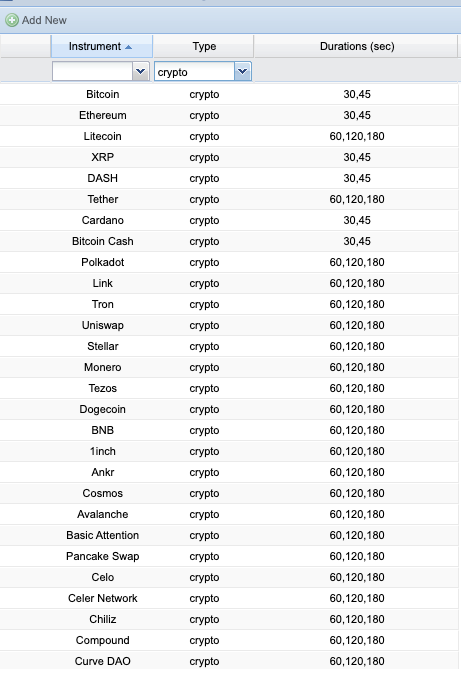
The configuration interface displays all available duration options that can be enabled or disabled for the selected asset.
Available Duration Options
The following duration times can be configured per asset:
| Duration | Typical Use Case | Recommended Assets | Risk Level |
|---|---|---|---|
| 10 Seconds | Ultra-fast trading on controlled volatility | Synthetic indices (Volatility 10, 25, 50, etc.) | Extreme |
| 15 Seconds | High volatile assets with tight spreads | BTC/USD, ETH/USD, major crypto pairs | Very High |
| 30 Seconds | Standard fast trading | Major forex pairs, liquid assets | High |
| 60 Seconds | Most popular duration | All asset types | Medium-High |
| 2 Minutes | Medium-term Turbo trades | Commodities, indices, stocks | Medium |
| 5 Minutes | Longer Turbo trades with more analysis time | Less volatile assets, indices | Medium-Low |
Configuration Best Practices
1. Synthetic Assets (Volatility Indices, Crash/Boom)
Recommended durations: 10s, 15s, 30s, 60s
Rationale:
- Synthetics have controlled volatility patterns
- 24/7 availability with consistent pricing
- Tight spreads support ultra-short durations
- No market gaps or slippage concerns
2. Major Cryptocurrencies (BTC, ETH, major pairs)
Recommended durations: 15s, 30s, 60s, 2m
Rationale:
- High volatility requires slightly longer minimum durations
- Enable 15s only during high liquidity periods
- Spreads can widen during volatile moves
- Consider disabling ultra-short durations during low liquidity hours
3. Major Forex Pairs (EUR/USD, GBP/USD, USD/JPY)
Recommended durations: 30s, 60s, 2m, 5m
Rationale:
- High liquidity during major trading sessions
- Tight spreads support shorter durations
- Enable 30s only during London/NY overlap
- Disable very short durations during Asian session or low volume periods
4. Minor/Exotic Forex Pairs
Recommended durations: 60s, 2m, 5m
Rationale:
- Wider spreads require longer minimum durations
- Lower liquidity increases execution risk on ultra-short trades
- More susceptible to news events and volatility spikes
5. Commodities (Gold, Silver, Oil)
Recommended durations: 60s, 2m, 5m
Rationale:
- Commodities can have slower price movements
- Spreads may be wider than forex majors
- News-driven volatility requires time for price discovery
6. Indices (S&P 500, NASDAQ, DAX, FTSE)
Recommended durations: 60s, 2m, 5m
Rationale:
- Index futures follow exchange hours - liquidity varies
- Less suitable for ultra-short durations
- Better performance with longer analysis windows
7. Stocks/CFDs
Recommended durations: 2m, 5m
Rationale:
- Individual stocks can have wider spreads
- Limited to exchange trading hours
- Require longer durations for fair pricing
Risk Management Considerations
Spread-to-Duration Ratio
Ensure the asset's typical spread is appropriate for the minimum duration:
Liquidity Requirements
Short duration options require high liquidity:
- 10s durations: Require continuous tight spreads and instant execution
- 15s durations: Need very high liquidity, only enable during peak hours
- 30s+ durations: Can work with moderate liquidity
Volatility Matching
Match duration availability to asset volatility:
- Low volatility assets: Disable very short durations (10s, 15s, 30s)
- Medium volatility: Enable 30s, 60s, 2m, 5m
- High volatility: Enable 15s, 30s, 60s, 2m
- Synthetic/controlled: Can enable all durations including 10s
Session-Based Configuration (Advanced)
For optimal risk management, consider different duration configurations based on trading sessions:
Example: EUR/USD Configuration
| Trading Session | Time (GMT) | Enabled Durations | Reason |
|---|---|---|---|
| Asian Session | 00:00 - 08:00 | 60s, 2m, 5m | Lower liquidity, wider spreads |
| London Open | 08:00 - 09:00 | 30s, 60s, 2m, 5m | High volatility, increasing liquidity |
| London Session | 09:00 - 13:00 | 30s, 60s, 2m, 5m | Stable liquidity, tight spreads |
| London/NY Overlap | 13:00 - 16:00 | 30s, 60s, 2m, 5m | Peak liquidity, tightest spreads |
| NY Session | 16:00 - 21:00 | 30s, 60s, 2m, 5m | Good liquidity, moderate spreads |
| After Hours | 21:00 - 00:00 | 60s, 2m, 5m | Declining liquidity |
Note: Session-based configuration requires advanced scheduling features. Contact support if you need dynamic duration availability based on time of day.
Configuration Workflow
For Each Asset:
- Analyze Asset Characteristics
- Check average spread during different sessions
- Measure typical volatility (ATR, standard deviation)
- Review liquidity depth and execution quality
- Select Appropriate Durations
- Enable durations that match volatility and spread
- Start conservative (longer durations only)
- Test shorter durations in demo/low-volume first
- Enable in Admin Panel
- Check the boxes for desired durations
- Save configuration
- Verify changes appear on trading platform
- Monitor Performance
- Track win rates per duration
- Monitor client complaints about execution
- Review spread-to-duration ratios during trading
- Adjust configuration based on data
Common Configuration Scenarios
Scenario 1: Conservative Broker (Risk-Averse)
Approach: Enable only longer durations across all assets
- All assets: 60s, 2m, 5m only
- No 10s or 15s durations enabled
- 30s enabled only for major forex pairs during peak hours
- Benefit: Lower risk, fewer complaints, easier to manage
Scenario 2: Aggressive Broker (High-Volume Focus)
Approach: Enable wide range of durations to maximize trading frequency
- Synthetics: 10s, 15s, 30s, 60s
- Major Crypto: 15s, 30s, 60s, 2m
- Major Forex: 30s, 60s, 2m, 5m
- Others: 60s, 2m, 5m
- Benefit: Attracts high-frequency traders, more trading volume
Scenario 3: Balanced Approach
Approach: Enable durations based on asset type and liquidity
- Synthetics: 10s, 15s, 30s, 60s, 2m
- Major Crypto: 30s, 60s, 2m
- Major Forex: 30s, 60s, 2m, 5m
- Commodities: 60s, 2m, 5m
- Indices: 60s, 2m, 5m
- Benefit: Optimized for each asset class, good balance of volume and risk
Regulatory and Compliance Considerations
Jurisdiction-Specific Requirements
Some jurisdictions regulate minimum duration times for binary options or Turbo trading:
- European Union: Check ESMA guidelines on minimum durations
- UK (FCA): May have restrictions on very short durations
- Australia (ASIC): Review binary options regulations
- Other regions: Consult local regulatory requirements
Client Segmentation
Consider different configurations for different account types:
- Demo Accounts: Enable all durations for practice
- Standard Accounts: Enable conservative duration set
- VIP/Professional Accounts: Enable full range including ultra-short durations
- Restricted Jurisdictions: Disable durations below regulatory minimums
Testing and Validation
Before Enabling Short Durations
- Technical Testing
- Verify price feed latency is under 100ms
- Test execution speed under load
- Confirm spread stability during test period
- Demo Account Testing
- Enable durations on demo accounts first
- Monitor for 1-2 weeks
- Collect feedback from demo traders
- Limited Rollout
- Enable for VIP accounts only initially
- Monitor performance and complaints
- Gradually expand to all accounts
Monitoring and Optimization
Key Metrics to Track
| Metric | Target | Action if Outside Target |
|---|---|---|
| Client Win Rate | 40-50% | If under 40%, review spread and execution quality |
| Average Spread | Asset-dependent | If widening, consider disabling shortest durations |
| Execution Speed | < 500ms | If slower, disable ultra-short durations |
| Client Complaints | < 1% | Investigate issues, adjust durations |
| Trading Volume | Increasing | If decreasing, may need more duration options |
Regular Reviews
- Weekly: Review metrics dashboard for anomalies
- Monthly: Analyze performance by asset and duration
- Quarterly: Comprehensive review and optimization
- After Major Events: Review impact of news events, market crashes, etc.
Troubleshooting
Issue: Clients complaining about "unfair" execution
Solution:
- Check if spread is too wide for the enabled durations
- Review execution logs for delays
- Consider disabling very short durations for that asset
- Verify price feed quality and latency
Issue: Low trading volume on Turbo trades
Solution:
- May need to enable more duration options
- Check if competitors offer shorter durations
- Consider marketing/education about Turbo features
- Ensure UI clearly shows available durations
Issue: Duration options not showing on platform
Solution:
- Verify configuration was saved in admin panel
- Check if cache needs to be cleared
- Confirm asset is active and available for trading
- Review any session-based or time-based restrictions
FAQs
Can I change duration configuration in real-time?
Yes, changes take effect immediately. However, active trades with previously enabled durations will complete normally.
What happens to active trades if I disable a duration?
Active trades continue until their expiry. Only new trades are affected by the configuration change.
Can I set different durations for different account types?
This requires advanced configuration. Contact technical support for client-segmentation features.
Should I enable all durations by default?
No. Start conservative with longer durations (60s, 2m, 5m) and gradually enable shorter ones after testing and monitoring performance.
How do I know if a duration is appropriate for an asset?
Check that: (1) Average spread is under 20% of expected price movement during duration, (2) Execution is consistently fast, (3) Liquidity is sufficient, (4) Volatility supports meaningful price movement in the timeframe.
Summary
The Duration per Asset configuration feature provides powerful control over your Turbo trading offering:
- ✓ Customize duration options per individual asset
- ✓ Match durations to asset characteristics (volatility, liquidity, spread)
- ✓ Manage risk by limiting ultra-short durations on volatile assets
- ✓ Comply with regulatory requirements per jurisdiction
- ✓ Optimize client experience with relevant duration choices
- ✓ Monitor and adjust based on performance data