
Turbo Trading
What is Turbo Trading?
Turbo is an ultra-fast trading mode designed for traders who thrive on quick decisions and rapid results. With duration times ranging from 10 seconds to 5 minutes, Turbo trading allows you to capitalize on micro-movements in the market and execute multiple trades within a short time frame.
How Turbo Differs from High/Low: Unlike High/Low options where you select a specific expiry time in the future (e.g., end of hour or end of day), Turbo works on a duration-based model. When you place a Turbo trade, the expiry time is calculated as current time + duration period. This means you can enter a trade at any moment, and it will expire after the selected duration has passed.
Example: If you select a 60-second duration and place your trade at 14:23:45, your trade will expire at 14:24:45 - exactly 60 seconds from your entry time.
Duration-Based Trading Model
Turbo trading uses a duration-based approach, which is fundamentally different from High/Low trading:
- High/Low: You select a fixed expiry time (e.g., 15:00, 16:00, end of day). All trades expire at the same predetermined time regardless of when you enter.
- Turbo: You select a duration period (e.g., 60 seconds, 2 minutes). Each trade expires based on when YOU entered + the duration. This allows for maximum flexibility and the ability to trade at any moment.
How Duration Works
When you place a Turbo trade:
- You select your duration (10s, 15s, 30s, 60s, 2m, or 5m)
- Entry time is recorded at the moment you confirm the trade
- Expiry time = Entry time + Duration
- The trade settles automatically at expiry
Example Scenarios:
- Enter at 14:23:17 with 60s duration → Expires at 14:24:17
- Enter at 09:45:00 with 2m duration → Expires at 09:47:00
- Enter at 11:30:55 with 10s duration → Expires at 11:31:05
How Turbo Trading Works
Step 1: Access Turbo Mode
Navigate to the trading platform and select "Turbo" from the trading mode dropdown. The interface will switch to show ultra-short expiry times optimized for quick trading.
Step 2: Select Your Asset
Choose from a variety of assets including:
- Currency Pairs: EUR/USD, GBP/USD, USD/JPY, etc.
- Commodities: Gold, Silver, Oil
- Indices: S&P 500, NASDAQ, FTSE 100
- Cryptocurrencies: Bitcoin, Ethereum (if available)
Step 3: Choose Duration Time
Select your preferred duration time. Your trade will expire at entry time + duration:
- 10 Seconds: Ultra-fast option for synthetic assets with high volatility
- 15 Seconds: Designed for high volatile assets, extremely fast-paced trading
- 30 Seconds: Fast option for extreme short-term traders
- 60 Seconds: Most popular Turbo option, balances speed with analysis time
- 2 Minutes: Allows for slightly more market movement
- 5 Minutes: Longest Turbo option, still considered very short-term
Available duration times vary by asset type. Each asset can be configured with specific duration options based on its volatility and trading characteristics. For example:
- Synthetic instruments may offer 10s, 15s, 30s, 60s durations
- High volatile assets (major crypto, news-driven FX) offer 15s, 30s, 60s, 2m durations
- Standard assets offer 30s, 60s, 2m, 5m durations
The platform will only display duration options that are enabled for the selected asset.
Step 4: Make Your Prediction
Analyze the current price and predict the direction:
- HIGHER (Call): Click if you believe the price will be higher at expiry than the current entry price
- LOWER (Put): Click if you believe the price will be lower at expiry than the current entry price
Step 5: Set Investment Amount
Enter your desired investment amount. The platform will automatically display:
- Your potential profit (usually 70-85% return)
- Total payout if successful
- Current payout percentage
Step 6: Execute Trade
Click "Buy" or "Confirm" to execute your trade. Once confirmed:
- Your trade is immediately active at the current market time
- Expiry time is automatically calculated as current time + selected duration
- A countdown timer shows remaining time until expiry
- Real-time chart displays current price movement
- Entry price is locked and marked on the chart
Step 7: Wait for Expiry
Monitor your trade as it progresses:
- Watch the countdown timer
- Observe price movements in real-time
- Track if you're currently "In the Money" (winning) or "Out of the Money" (losing)
- No action needed - trades auto-close at expiry
Step 8: Settlement
At expiry, the trade is automatically settled:
- Win: If your prediction is correct, profit is credited to your account instantly
- Loss: If incorrect, you lose the invested amount
- Tie: In rare cases where price equals entry price, investment is typically refunded
Trading Interface Features
Real-Time Chart
The Turbo trading interface includes:
- Tick-by-tick price updates
- Entry price line marked clearly
- Color-coded indicators (green for winning, red for losing)
- Countdown timer overlay
- Multiple chart types (line, candlestick, bar)
Quick Trade Panel
Streamlined controls for rapid execution:
- One-click asset switching
- Preset investment amounts for quick selection
- Instant buy buttons for HIGHER/LOWER
- Live payout percentage display
Active Trades Display
Monitor all active Turbo trades in one place:
- List of open positions
- Current profit/loss status
- Time remaining for each trade
- Quick access to close or modify positions (if platform allows early closure)
Turbo Trading Strategies
1. Momentum Trading
Best for: 60-second and 2-minute Turbo trades
How it works:
- Identify strong directional movements
- Enter trades in the direction of momentum
- Look for consecutive candles in same direction
- Use when market shows clear trend
2. Breakout Strategy
Best for: 2-minute and 5-minute Turbo trades
How it works:
- Identify support/resistance levels
- Wait for price to break through these levels
- Enter trade in direction of breakout
- Confirm with increased volume
3. News Trading
Best for: 30-second and 60-second Turbo trades
How it works:
- Monitor economic calendar for high-impact news
- Wait for news release
- Enter trade based on initial market reaction
- Be prepared for high volatility
4. Reversal Trading
Best for: 60-second and 2-minute Turbo trades
How it works:
- Identify overbought/oversold conditions
- Look for reversal signals (candlestick patterns)
- Enter trade against the current movement
- Use RSI or Stochastic indicators for confirmation
Technical Indicators for Turbo Trading
Moving Averages
Use short-period MAs (5, 10, 20) to identify immediate trends:
- Price above MA = uptrend, consider HIGHER trades
- Price below MA = downtrend, consider LOWER trades
- MA crossovers signal potential reversals
RSI (Relative Strength Index)
Identify overbought/oversold conditions:
- RSI above 70 = overbought, potential LOWER trade
- RSI below 30 = oversold, potential HIGHER trade
- Best used with 5 or 10-period setting for Turbo
Bollinger Bands
Measure volatility and potential reversals:
- Price touching upper band = potential LOWER trade
- Price touching lower band = potential HIGHER trade
- Squeeze (narrow bands) signals breakout coming
MACD
Identify momentum and trend changes:
- MACD crossing above signal = HIGHER trade
- MACD crossing below signal = LOWER trade
- Use with short settings (5, 10, 15) for Turbo
Risk Management in Turbo Trading
Position Sizing
- Never risk more than 1-2% per trade: If you have $1,000, risk only $10-20 per Turbo trade
- Use consistent amounts: Don't vary trade sizes based on previous wins/losses
- Account for frequency: With multiple trades per hour, losses can accumulate quickly
Daily Loss Limits
- Set a maximum daily loss amount (e.g., 5% of account)
- Stop trading when limit is reached
- Resume the next trading day with clear mindset
- Track win rate and adjust strategy if below 55%
Win Goals
- Set realistic daily profit targets (e.g., 3-5%)
- Consider stopping after reaching goal to lock in profits
- Don't let greed lead to overtrading
- Review successful strategies and repeat them
Emotional Control
- Avoid revenge trading: Don't increase trade size after losses
- Take breaks: Step away after 3 consecutive losses
- Stay disciplined: Follow your strategy even during winning streaks
- Don't chase losses: Accept losses as part of trading
Best Times to Trade Turbo
Forex Assets
- London Session Open (8:00-9:00 GMT): High volatility, many opportunities
- New York Session Open (13:00-14:00 GMT): Overlap with London creates volume
- Major News Releases: NFP, CPI, Interest Rate decisions
- Avoid: Asian session for non-Asian pairs (low volatility)
Commodities
- Gold: London and New York sessions
- Oil: U.S. trading hours, inventory reports
- Silver: Similar to gold, high volatility periods
Indices
- U.S. Indices: 14:30-21:00 GMT (U.S. market hours)
- European Indices: 8:00-16:30 GMT (European market hours)
- Asian Indices: 0:00-8:00 GMT (Asian market hours)
Common Mistakes to Avoid
1. Overtrading
Problem: Taking too many trades without proper analysis
Solution: Set a maximum number of trades per day (e.g., 10-15)
2. Ignoring Market Conditions
Problem: Trading during low volatility or ranging markets
Solution: Check volatility indicators before trading, avoid dead hours
3. Chasing Every Movement
Problem: Entering trades on every small price change
Solution: Wait for clear signals that match your strategy
4. No Trading Plan
Problem: Random trading without clear entry/exit rules
Solution: Develop and follow a written trading plan
5. Poor Money Management
Problem: Risking too much per trade or entire account
Solution: Stick to 1-2% risk per trade maximum
Turbo Trading Checklist
Before entering any Turbo trade, verify:
- ✓ Market has sufficient volatility
- ✓ Clear directional signal from indicators
- ✓ No major news scheduled in next 5 minutes (unless news trading)
- ✓ Investment amount is within risk limits
- ✓ Have clear reason for trade direction
- ✓ Not on tilt or trading emotionally
- ✓ Haven't reached daily loss limit
- ✓ Asset has good liquidity and tight spreads
Profit and Payout Structure
Typical Payouts
| Duration Time | Typical Payout | Risk Level | Best For |
|---|---|---|---|
| 10 seconds | 65-70% | Extreme | Synthetics |
| 15 seconds | 68-73% | Very High | High Volatile Assets |
| 30 seconds | 70-75% | Very High | All Assets |
| 60 seconds | 75-80% | High | All Assets |
| 2 minutes | 80-82% | Medium-High | All Assets |
| 5 minutes | 82-85% | Medium | All Assets |
Example Calculation
Investment: $100
Payout: 80%
Winning Trade: $100 + ($100 × 0.80) = $180 total ($80 profit)
Losing Trade: $0 return ($100 loss)
Admin Configuration: Duration per Asset
Administrators can configure custom duration options for each individual asset through the admin panel. This powerful feature allows brokers to tailor the trading experience based on asset characteristics, market conditions, and risk management requirements.
How to Configure Duration per Asset
In the admin back-office, navigate to the asset management section where you can customize which duration options are available for each specific asset:
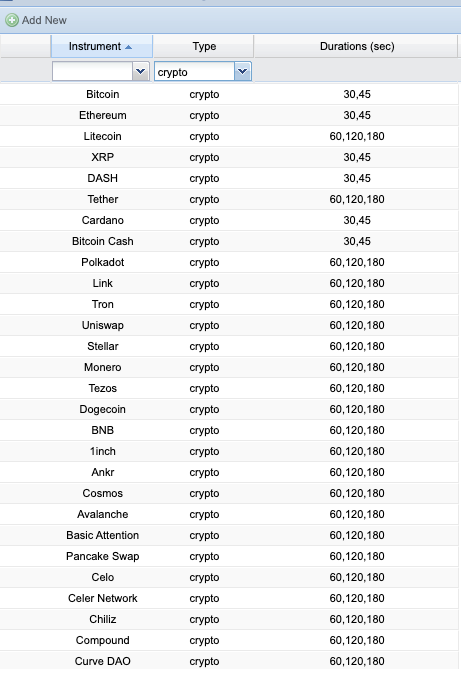
Configuration Options
For each asset, administrators can enable or disable specific duration times:
- 10 Seconds: Enable for synthetic assets with controlled volatility
- 15 Seconds: Enable for high volatile assets (major cryptocurrencies, volatile forex pairs during news)
- 30 Seconds: Standard option for most assets
- 60 Seconds: Most popular duration, available for all asset types
- 2 Minutes: Standard option for medium-term Turbo trades
- 5 Minutes: Longer duration for less volatile assets or risk management
Use Cases for Custom Duration Configuration
1. Risk Management
Disable very short durations (10s, 15s) for highly volatile assets during news events to reduce extreme risk exposure.
2. Market Conditions
Enable shorter durations for synthetic assets that have 24/7 availability and controlled volatility patterns.
3. Asset Characteristics
- Cryptocurrencies: Enable 15s, 30s, 60s for major pairs like BTC/USD, ETH/USD
- Forex Majors: Enable 30s, 60s, 2m for EUR/USD, GBP/USD during active sessions
- Synthetics: Enable 10s, 15s, 30s, 60s for volatility indices
- Commodities: Enable 60s, 2m, 5m for gold, oil, silver
- Indices: Enable 60s, 2m, 5m for S&P 500, NASDAQ, DAX
4. Regulatory Compliance
Certain jurisdictions may require minimum duration times. Administrators can disable shorter durations for specific regions or account types.
5. Client Segmentation
Different account types (demo, standard, VIP) can have different duration options available based on experience level and risk tolerance.
Benefits of Duration per Asset Configuration
- Flexibility: Tailor trading experience to each asset's unique characteristics
- Risk Control: Limit exposure on highly volatile instruments
- Better UX: Show only relevant duration options for each asset
- Compliance: Meet regulatory requirements per region or asset class
- Strategic Positioning: Differentiate offering by providing optimal durations per asset
Platform-Specific Features
Early Closure (if available)
Some platforms allow closing Turbo trades before expiry:
- Lock in profits if trade is going well
- Minimize losses if trade is going against you
- Usually available after 50% of time has elapsed
- May have reduced payout (e.g., 70% instead of 80%)
Rollover (if available)
Extend trade duration if needed:
- Add extra time to a losing trade
- Usually requires additional investment
- Use sparingly as it increases risk
- Not available on all Turbo timeframes
Double Up (if available)
Duplicate a winning position:
- Available when trade is in profit
- Doubles your potential profit
- Also doubles your risk
- Use only with strong conviction
Practice and Training
Demo Account
Before trading Turbo with real money:
- Practice on demo account for at least 2 weeks
- Test different strategies and expiry times
- Track your win rate and profit/loss
- Aim for 60%+ win rate before going live
Start Small
- Begin with minimum trade size
- Gradually increase as you gain confidence
- Don't rush to large positions
- Focus on consistency over large wins
Advanced Tips
Multi-Asset Trading
Trade multiple assets simultaneously to:
- Diversify risk across different markets
- Increase number of trading opportunities
- Smooth out equity curve
- Reduce impact of single asset volatility
Pattern Recognition
Learn to quickly identify:
- Candlestick patterns (engulfing, doji, hammer)
- Chart patterns (triangles, flags, double tops/bottoms)
- Support/resistance levels
- Trend lines and channels
Market Correlation
Understand how assets move together:
- USD strength affects multiple currency pairs
- Gold and USD typically move inversely
- Oil prices impact oil-producing currencies (CAD, RUB)
- Use correlation to confirm trade direction
Summary
Turbo trading offers exciting opportunities for quick profits, but requires:
- Speed: Quick decision-making and execution
- Discipline: Strict adherence to trading rules
- Focus: Concentration during trading sessions
- Practice: Extensive demo trading before live
- Risk Management: Proper position sizing and limits
Next Steps
- Open a demo account and practice Turbo trading
- Study technical indicators and how to apply them
- Develop a written trading plan specific to Turbo
- Track your trades and analyze results
- Read about other platform features: High/Low, 1000x, Above/Below