
Painel de desempenho do agente
Direct Youtube link - https://youtu.be/qks1WAMS7gY
The Agent Performance Dashboard allow both managers and sales agents to analyze their daily, weekly and monthly results and see where they need to focus and improve.

The Agent Performance Dashboard is built from 4 sections:
- Performance
- Deposits
- Withdrawals
- Trades
Each section is exportable (Permission Based).
The report is pre-filtered by platform, allowing our brands to see all data from their FX/CFD, Options and MT4/5 Platforms.

The Performance section is also divided to 3 groups
Each group has it's own permissions
Each row has it's own description tool tip
This is the only report that has separated currency selection.
This part is built on the basics of the Campaign Performance report and can be show per:
- Daily
- Weekly
- Monthly
- Quarterly
The Agent Performance group:
Is on a user level and is not filtered by Currency or platform
This group is updated live.

The Transaction Performance group:
This group is filtered by the currency and platform selected
This group is updated every round 1 min

The Trades Performance group:
This group is filtered by the currency and platform selected
This group is updated every round 1 min
The Opened values are according to the Agent / Subgroup the trade was assign on opening time
The Closed values are according to the Agent / Subgroup the trade was assign on closing time

The Deposits report is:
Filtered by the 4 top filters:
- Platform
- Agent
- Subgroup
- Time Period
The date filter of this report will override the top date filter.

The Withdrawal report is:
Filtered by the 4 top filters:
- Platform
- Agent
- Subgroup
- Time Period
The date filter of this report will override the top date filter
This report will show ONLY processed withdrawal

The Trades report is:
Filtered by the 4 top filters:
- Platform
- Agent
- Subgroup
- Time Period
The date filter of this report will override the top date filter
This report will show the list of trades that were assigned on closing time.

To load the dashboard, simply click the "Agent Performance" Icon.

Please note, the dashboard is permission based. Make sure you have the right permission before you try to load the dashboard.
These are the list of permissions for this report:
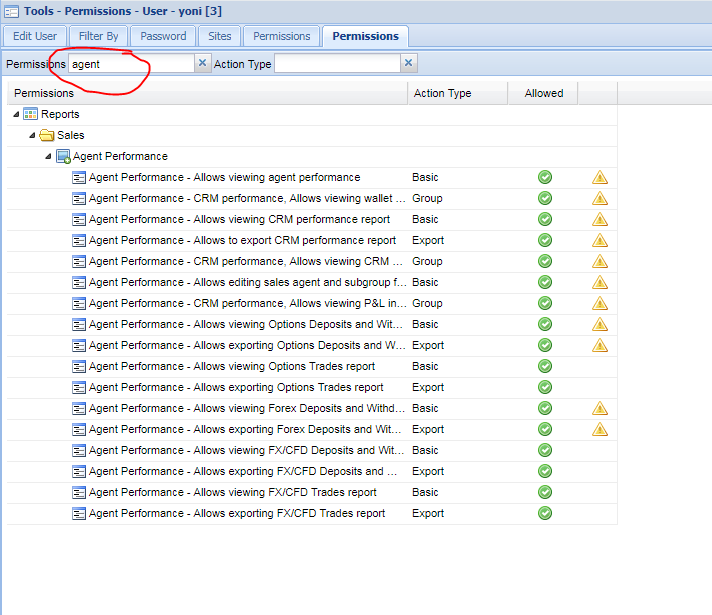
If the CRM user doesn't have the permission to edit Agent / Subgroup filter than the data available for him is only the data relevant to his agent