
Como Desenvolver e Gerenciar Traders
Overview:
Every affiliate has links to develop traders, once the trader register with this link, it will be marked with this affiliate number and appear as this affiliate's referrals.
Step 1: Broker needs to create marketing materials(banners, landing pages, images, links, etc) from https://partners.brand.com/admin (The IB/Affiliate management system).
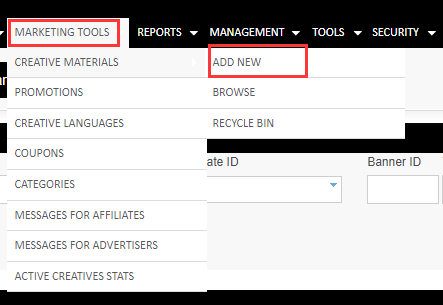
Click on "Marketing tools"--"Creative materials"--"Add New"
Step2: For each creative, broker set a landing url, where the traffic is going to. it can be a landing page with registration form, a complete external content website with registration form, or directly to the trading site.
Choose banner language, input banner name, choose picture and upload, then click on "Save"

Step 3: The affiliates go to https://partner.brand.com/ and generates himself a script or url to go along with the selected banner, together with his btag/aid (a unique identifier assigned to him by the affiliate system).
Click on "Get Tracking Code"
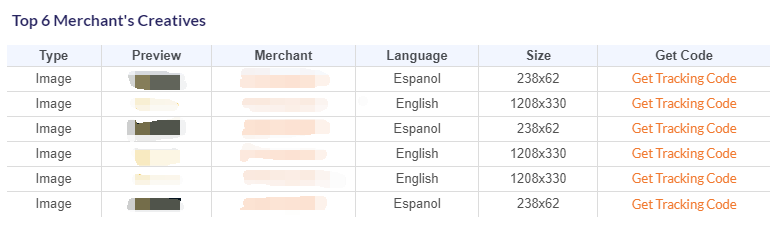
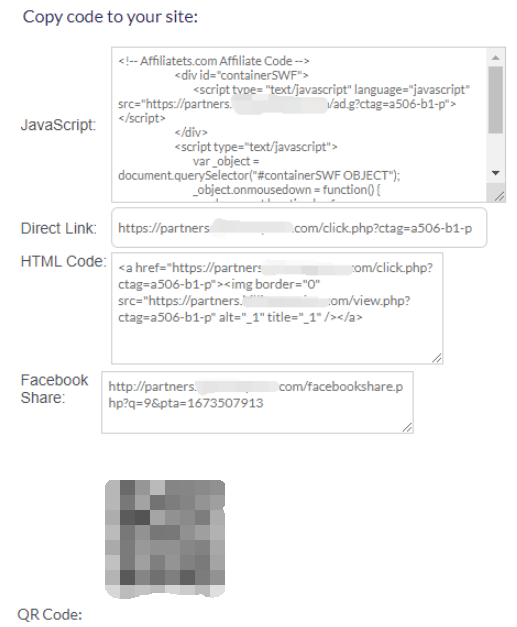
Then Affiliate will get script or URL, all creatives are first going to https://partners.brand.com/click.php?ctag=xxxx-b1-p (with the relevant affiliate ID and all the other unique identifiers) and then the user is being automatically redirected to the end url (the destination url) => which comes with a full btag parameter.
Step 4: Users register from any creative will be tagged as this affiliate ID and register under this affiliate.