
Akun Latihan
In the trading world, practice account is commonly used to attract client in order to explore the trading world and practice new learned Technics. It means that the account will be at the use of both the retention and the conversion team.
The practice account has the same trading options as real account, with a clear "Practice Account" sign on it.
Understanding Real vs Practice concept
To decide what to offer your clients, first you need to understand the difference between the wallets and their stages:
Simple-Trader (High/Low)
This platform offers a single wallet per user - and all clients get Real wallet by default.
This Real wallet can be switched between Real mode and Practice mode.
So when a user choose "Practice Account" in the registration, he will get a Real wallet, in Practice Mode, and he can switch between Real and Practice modes from within the platform.
If the client choose "Real Account" during registration he will get ONLY real account, without practice switch.
Wow-Trader CFD (Buy/Sell)
This platform offers multiple wallets per user, and the client can open real and practice wallets in different currencies for different purposes.
In the platform there is a wallet selector, allowing the user to switch between wallets.
So when a user choose "Practice Account" in the registration, he will get a practice CFD wallet, and he can add another Real wallet from within the platform.
If the client choose "Real Account" during registration he will get ONLY real wallet, and he can add Practice wallet from within the platform..
General description
1-The use of this account:
- Practice account for existing clients.
- Practice account for new clients.
2-How to create Practice Account?
The creation of Practice account is enabled from both the client's side and the back office.
A- Practice account creation from the client's side:
When the client is doing a new registration:
- He has the option to choose whether to open a real account or a practice account in the registration form.
- Upon registration to practice account, both real and practice accounts will be opened behind the scene
- The client will be auto logged in to the practice account
- The practice account will be credited with $1,000 practice money per default, if you want to modify the account please consult with your account manager.
- Default time limit of 1 week will be set as expiration time, if you want to modify the expiration time please consult with your account manager.
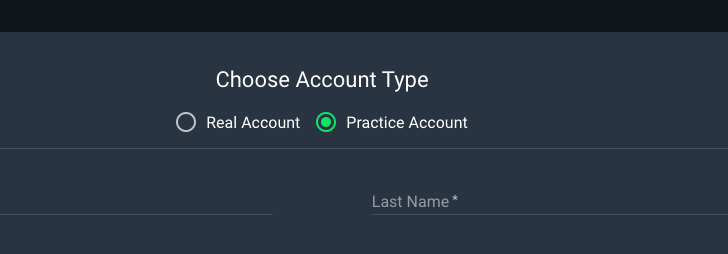
For the existing clients:
- The client can request practice account but the retention person need to approve or decline.
B-Practice account creation from the back office:
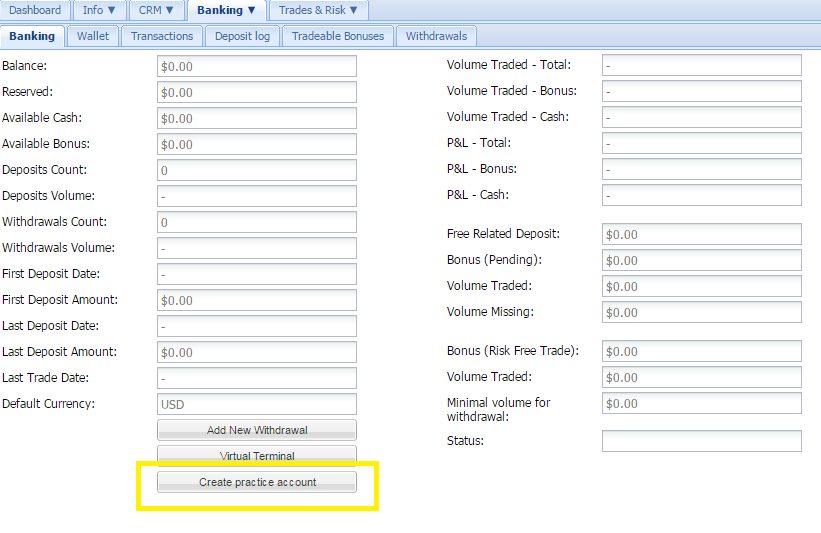
- The ability to open practice account from the back office will be only for existing clients.
- The creation of such account will be after a request from the client or as part of a sale's offer.
- In the banking tab, the CRM user can click on "Create practice account" button.
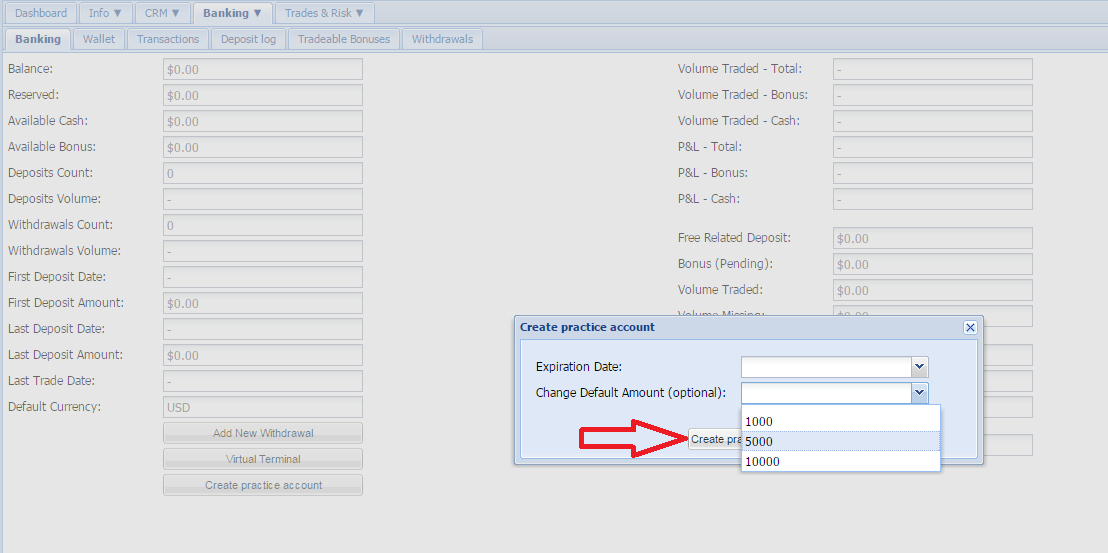
- A practice account can be with one of 3 set amount ($1,000, $5,000 or $10,000) with a time limit.
- On the trading platform, the client sees "Trade on practice account" in the account settings, which will log him in to his practice account.
When the client has a practice account you will find all the info related to this functionality under the Practice tab :

3- How to log in to the practice account:
- The log in form / widget will not change if you are choosing to add the practice account option to the registration page
- If the client never logged in to his real account, the system will automatically log him in to his practice account
- If the client logged in even once to his real account, then the system will log him directly to his real account.
- If the client never logged in to his real account and the practice account was expired – will log him to his practice account
- From the real account, the client can switch to practice account from the account settings.
4- Functionality
- The client will not have any IP restrictions
- The practice accounts are automatically credited with a set amount:
-$1,000 – for new accounts
-$1,000, $5,000 or $10,000 – for existing clients
- The practice account has an expiration date of 1 week for new and existing clients.After 1 week the account will be marked as disabled and the following message will pop up "Practice account expired, click here to switch to real account".In the trading platform the client will show countdown until account expires.
- The CRM user can extend the expiration date on weekly base directly from the back office.
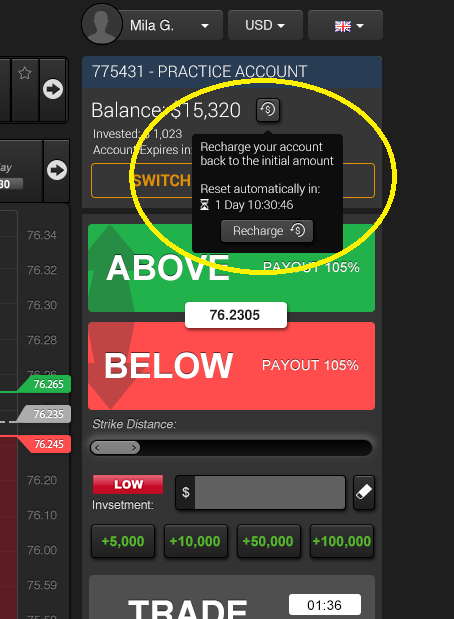
- The practice accounts are automatically reset every 48 hours, it means the balance will be refilled with the default amount.
- The My Trades report on the client side only will be cleared
- The Transactions report on the client side only will be cleared
- Trade Monitoring:
-No Rejected trades will happen
-It is out of the trade monitoring management limits and calculation
5- Practice account statuses
- Expired account:
-Will hover the page with a massage: "Your practice account has been expired, click here to switch to real account"
-The client will not be able to do anything on the account, only click on the link
- Frozen account: Same as for the real account – The client will not be able to place a trade.
- Blocked account:The client will not be able to log in to any of the accounts.
6- Banking
- By clicking on the Deposit button "Make a deposit" the message "The deposit will be credited in your real account" will pop up.
- When clicking on the Confirm / Decline button :
-Confirm will redirect to deposit page in the real account
-Decline will leave him in the practice account
- The practice account are working like real accounts only a button was added:
-When logged in to practice: "Trade on real account"
-When logged in to real: "Trade on practice account"
- If the client wants to make a withdrawal the message "You cannot withdraw money from a practice account, click here to switch to real account" will pop up.
- The wallet: It is working like real accounts
- Transactions:
-It is showing the balance history of practice account only.
-Transaction summary is not appearing for practice account
- My trades: It is showing the practice account trades only.
- Expiry prices: It is working like real accounts
- Asset index: It is working like real accounts
- Autochartist: if the client click on the Autochartist the message "Autochartist is available for real accounts only, click here to switch to real account" will pop up.
- Video tutorials; if the client click on the videos widget the message "Video tutorials are available for real accounts only, click here to switch to real account" will pop up
If you have any additional question do not hesitate to contact the support team.