
Sistem IB/Afiliasi - Pendaftaran dan pelacakan API
The below instructions are related to operators that are using AffiliateTS (affiliate Buddies) IB/Affiliate management system, and would like to allow their affiliates to register users directly to our system via API, but also track them in the IB/Affiliate system.Instructions to link affiliate API user in IB/Affiliate system
Step 1 (Affiliate System): Register the user in the affiliate system
- Ask the affiliate to follow the regular registration flow, and activate his account.
- You should see in the system their affiliate ID.
*For this article, we will use aff 502 as an example. This will also be used in our system as his a_aid (affiliate token parameter) 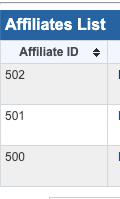
Step 2 (CRM): Create a CRM user and request us to grant him API access
- follow this article -
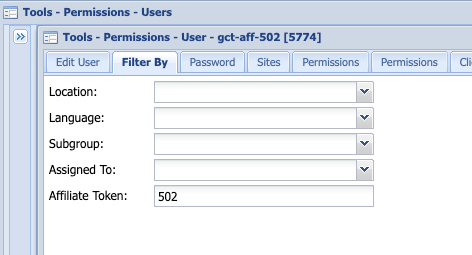
- Use the affiliateID generated by the affiliate system (502) as the CRM name and token.
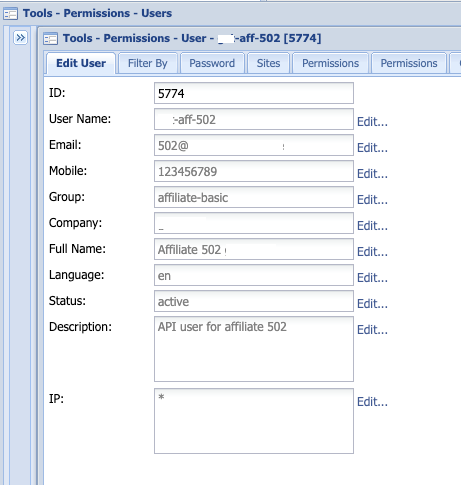
- Make sure to restrict the CRM user you created to see only leads with his specific token.
- Give your affiliate his API credentials:
- user (the CRM user you've created for him) - "gct-aff-502"
- password (the password generated by the system for the CRM user, or the one you created and edited)
- endpoint (based on your zone. Ask your TS account manager for this information) - for example - https://admin-api.hk-a.tradesmarter.com
- token (502 in our example)
Step 3: Register a user via API
Example of registration call:
Notes:
password = pass in MD5 format. (mandatory)
pass = regular format - 7-10 characters, at least one upper, one digit.
(mandatory only when MT4/5 is configured for the brand)
landing = For internal tracking and reporting, please make sure to add the ‘landing’ param with your relevant details:
{%22btag%22:%22a502-b1-p0-cIE-u94956716001616722360%22%2C%22campaign%22:%221%22%2C%22a_aid%22:%22502%22%2C%22serial%22:%22General_Link_to_Client_site--English%22%2C%22utm_source%22:%22affiliateBuddies%22%2C%22utm_campaign%22:%22XXaffiliate%22%2C%22utm_medium%22:%22affiliate%22%2C%22utm_term%22:%22502%22%2C%22utm_content%22:%221%22}
The landing param must contain the above parameters for full tracking. The affiliate can edit them to reflect his own dynamic campaigns.
If you only looking for registration tracking the affiliate should use {%22a_aid%22:%22502%22%2C%22btag%22:%22a502-b01-p%22}