Sistem Pemberitahuan Agen
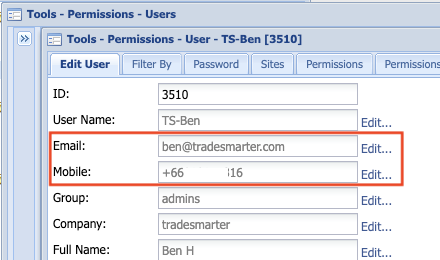
To set your internal notifications, first make sure to set proper email address for the relevant CRM agents:
*if you also want the agent/manager to receive an SMS notification, make sure his mobile is updated as well.
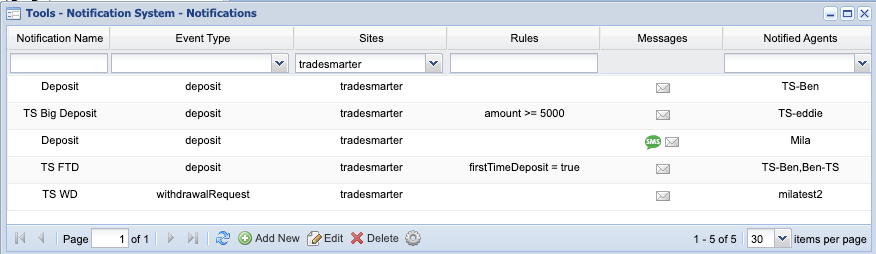
We currently support 5 types of notifications:
1. FTD - First time deposit notification.
2. Deposit - Notify the agent/manager on every deposit in the system.
3. Big Deposit - Notify the manager on a specific deposit above certain amount.
4. Withdrawal Request - Notify the agent/manager/compliance on withdrawal requests.
5. Margin Level Notification - Notify the agent/manager/compliance on uses that have reached to Margin call level.
***
for brokers using oneZero external execution and Swaps, 2 more events are available:
1. FX Wallet Swap Negative Balance.
2. FX Wallet External Execution Rejected
***
Subscribe to notification: [Tools => Notifications System => Notifications]
*If you can't see it in your CRM, please contact us to enable this permission.
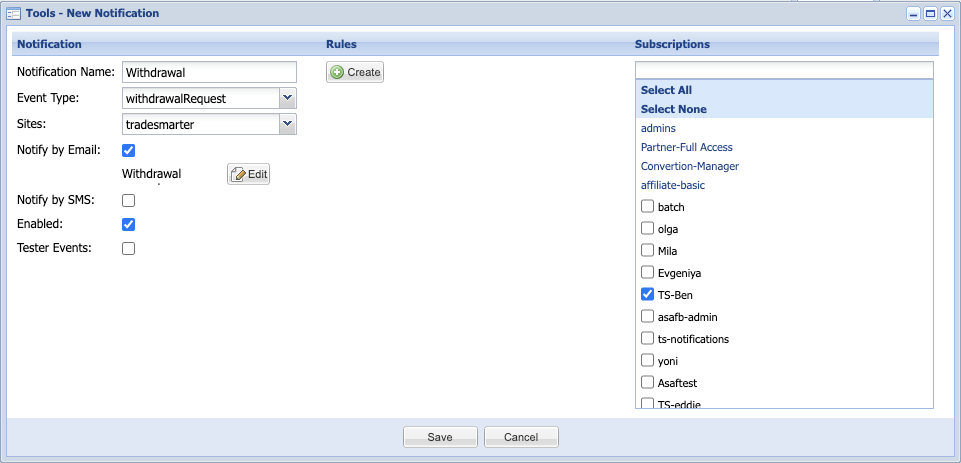
Create a new notification:
1. click "Add New".
2. assign a unique name to your notification (for example - "Withdrawal" or "Compliance WD"
3. Choose the type of notification from the list.
4. Select the relevant site.
5. Select if you want to subscribe to email or sms notification. (SMS notifications apply only if you have Nexmo account configured in our systems)
6. Select the notification template.
7. Enable/Disable.
8. Mark if you wish to get notifications for tester users as well.
9. Rules - if needed (for example, in Big deposit the rule will determine the amount limits)
10. select which agents you wish to subscribe for this notifications. (Agents can unsubscribe manually in their agent settings area).
11. Save