
Membuat permintaan Pengguna dan API CRM Afiliasi
Creating an Affiliate CRM User
There are various benefits to creating a back office user for your affiliate. With this user the affiliate can access vital information needed to increase campaign performance and track the overall quality of leads that are sent. The affiliate back office user is a requirement for the back office API which allows the affiliate to draw such information from our system.
1. Go to CRM
2. Find a user with similar functions (Tools => users) and duplicate it by right click => copy user:
Name : Type the identifying code for your company (eg - Tradesmarter = ts) and “-token-api”.
Make sure that the letters are all in small caps eg; ts-token-api
Group : keep as “affiliate-basic “
Full Name : Write the affiliate Full Name
IP : Write the affiliate IP (you can choose multi IP address with comma ‘,’ between the addresses ). You should not use the star (*) for affiliate IP's. 
After clicking “Submit” you will get the user and password in a small window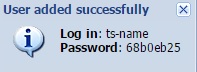 Please write the password in a safe place .
Configure Permissions (highly important configuration) :
1. Go Back to main CRM screen
2. Tools ->Permissions -> Users :
3. Find the new affiliates that you created
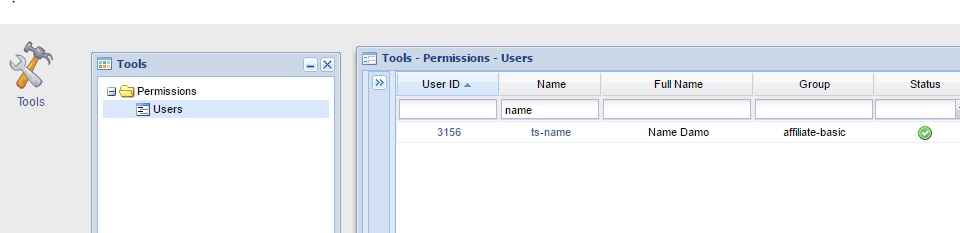
4. click on the name or id
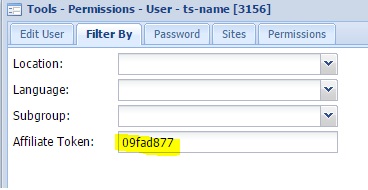
5. go to “Filter By”
6. Enter the correct token. This is very important configuration.
If no token was entered. The affiliate will be able see all leads from all affiliates.
7. Close all CRM Windows.
Requirements for API
Please inform us if you need a ADMIN-API or PLATFORM-API user or both :
it´s very important to know what the affiliate needs to achieve.
The use of a Admin API is to register user, perform wallet actions and extract information such as client details and actions on the client account from our back office.
The platform API is used for autologin. If your affiliate won't create autologin - you don't need for him Platform-api user.
Please note - one Admin API user can be assigned to multiple brands. Platform API user must be assigned single brand per user.
Please provide us on the Ticketing System the below details:
| 1. ADMIN or Platform API : | please explain what do you want to achieve with the API |
| 2. Log in Name : | |
| 3. Password : | |
| 4. Token : | |
| 5. IP : | |
| 6. Site | site/brand name |
after approving by our end , we will notify you that the API is enabled .