
SMS Function
Tradesmarter SMS Messaging

Our SMS function allows you to send text messages. Your team can have instant contact with their clients with the click of a button and you can send individual or bulk messages. You can use this function for campaigns or to drive deposits through event messaging. Please note that this feature requires integration with Nexmo.
How Does it work?
The SMS function will only work with clients who have verified their mobile number through the platform. This is very important when for instance sending bulk messages from the reports which we will explain further on in this article.
The verification process is as follows :
Once a user has registered an account he will need to activate the mobile notification.


Once the user clicks Verify, the system will send a code to his mobile through SMS.

The user now verifies his mobile number with the code that he received.


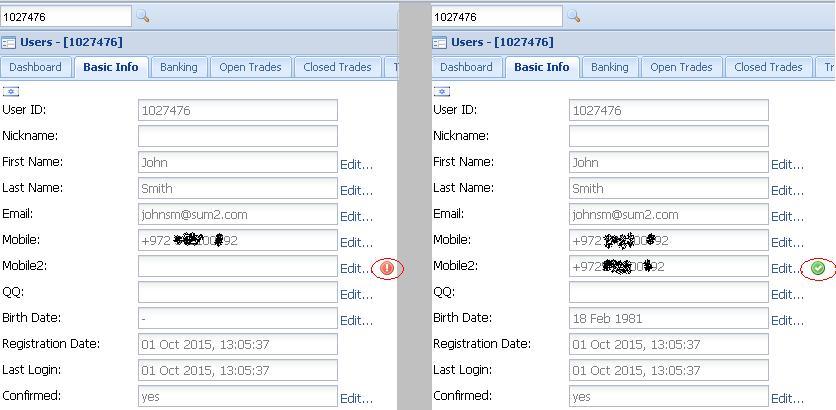
The verification process can be seen in the back office by checking the "Basic info" tab :
How to send an SMS from the back office

You can send messages directly from the client's account :


You can also send to individual Users or bulk Users directly from the "All Leads Report" by right clicking and choosing SMS from the drop down menu. Remember that only users that have verified their mobile through the platform can receive SMS messages so it is advised to filter the report with "Notifications - Yes"

Once you click submit, the message will be sent to the user.
Please note : The messaging system has a restriction of 11 characters that may be used in the senders name.